
Sample Sidebar Module

This is a sample module published to the sidebar_top position, using the -sidebar module class suffix. There is also a sidebar_bottom position below the menu.

get('tag_id');$tag_id = '';if ($tag_id != NULL) { $tag = $tag_id . ''; echo ' id="' . $tag . '"'; }?> &$item) : $class = ''; if ($item->flink == "") { $item->flink = "javascript:;"; } if (in_array($item->id, $path)) { $class .= ' s5_mobile_sidebar_active'; } if (!empty($class) && count($path)==1) { $class = ' class="'.trim($class) .'"'; } if ($item->level==1) { if ($item->deeper) { echo "

".$item->title."

"; echo "
"; } else { echo "

".$item->title."

"; continue; } } else { echo '
  • '; } // Render the menu item switch ($item->type) : case 'separator': case 'url': case 'component': if (!$item->deeper || $item->level > 1) { $sidebar_file = dirname(__FILE__) . '/sidebar_' . $item->type . '.php'; require $sidebar_file; } break; default: if (!$item->deeper || $item->level > 1) { $sidebar_url = dirname(__FILE__) . '/sidebar_url.php'; require $sidebar_url; } break; endswitch; // The next item is deeper. if ($item->deeper) { echo '
      '; } // The next item is shallower. elseif ($item->shallower) { echo ''; echo str_repeat('
    ', $item->level_diff); } // The next item is on the same level. else { echo '
  • '; } if (@$list[$i+1]->level==1 || !@$list[$i+1]->level) { echo '
    '; }endforeach;?>

    Sample Sidebar Module

    This is a sample module published to the sidebar_bottom position, using the -sidebar module class suffix. There is also a sidebar_top position below the search.
    Installing The Template

    • 01Download the installation package from our download section.
    • 02Once the download is complete go to the backend of Joomla.
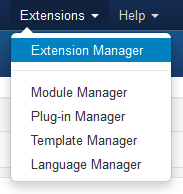
    • 03Navigate through your menu system to Extensions/Extensions Manager.
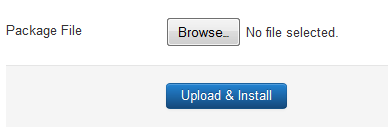
    • 04Once at the installation screen click the browse button and navigate to where you downloaded the template file.
    • 05Once you have the file selected click 'Upload File and Install'
    • The template is now installed, now let's set it as the default template:
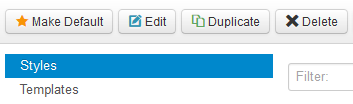
    • 06Navigate through your menu system to Extensions/Template Manager.
    • 07Find the radio button next to the newly installed template.
    • 08Click on the Default button at the top right of the screen and you're done!